Skip to content
Mix Directive

Features

Everything from the first import to the finished release.

Mix Directive brings your library, stems, mix, master, and release details into one desktop app for Windows, macOS, and Linux.

Workflows

Library

A searchable home for every song and version.

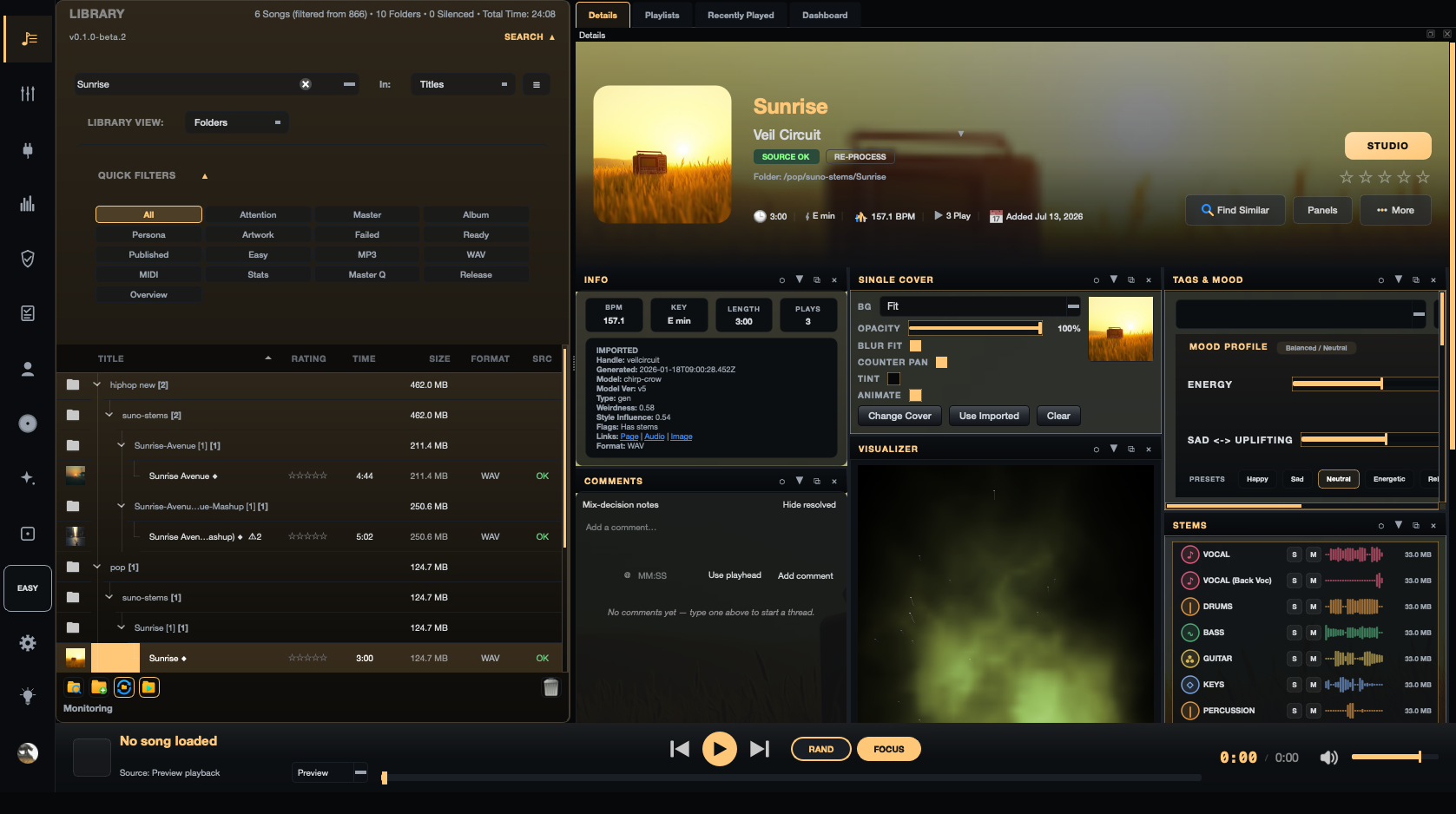
Point Mix Directive at your folders and ZIP downloads. Originals stay where they are while songs, stems, artwork, lyrics, and details become one library.
Scanning and duplicates
Folders and ZIP archives, with duplicate detection and previews that play without unzipping.
Song details
Tags, genres, notes, comments, artwork, lyrics, and bulk editing.
Analysis
Tempo, key, loudness, and stem health, plus Find Similar Songs.
Playlists
Playlists, folders, and Smart Playlists built from tags and status.
Library Review and History
Findings that need a decision, a timeline of changes, undo, and Trash.
Mix Directive Library showing a searchable song catalogue with folders, quick filters, song details, metadata, mood controls, and stem previews

Studio

Multitrack editing for stems, takes, and arrangements.

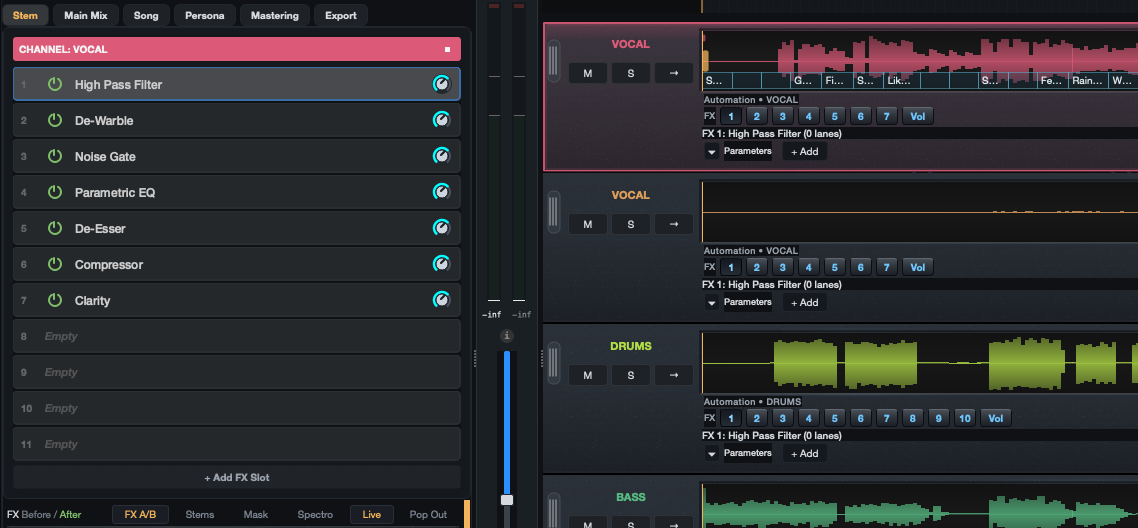
Studio opens a song as stems and clips on a timeline, with the editing tools you need to rearrange and tidy a performance.
Clip editing
Split, trim, fades, crossfades, snap, freeze, and bake.
Takes
Take lanes with Comp Takes and Pick Takes.
Time
Warp and quantise audio, Time & Pitch, and tempo-synced re-rendering.
Arrangement
Sections and markers across the timeline.
Undo history
A named Studio history with a recovery journal that survives a crash.
Mix Directive Studio showing the vocal channel chain — High Pass Filter, De-Warble, Noise Gate, Parametric EQ, De-Esser, Compressor, and Clarity — beside vocal, drums, and bass stem lanes with automation controls

Mixer

Routing and automation for a real mix.

Balance stems by hand or start from Auto-Mix, then route, automate, and compare against a reference.

Channels and buses
Volume, pan, mute and solo, group buses, VCAs, return tracks, and sends.
Sidechain and modulation
Sidechain compression and parameter modulation.
Automation
Volume and effect envelopes with bezier curves, automation modes, and Simplify Points.
Auto-Mix
A starting balance for every stem, which you can then change.
Reference tracks
A/B against another song with loudness matching.
Mix Directive Studio mixer with stem channels, level controls, and audio meters

Effects and plugins

51 built-in effects, plus your own plugins.

Native effects cover EQ, dynamics, saturation, modulation, stereo, space, and restoration. The Plugins workspace manages them alongside third-party plugins.

Dynamics and tone
Parametric and dynamic EQ, compressor, multiband compressor, limiter, clipper, transient shaper, saturation, and tape saturation.
Space and modulation
Reverb, delay, chorus, flanger, phaser, doubler, and stereo width tools.
Restoration
De-noise, de-hum, de-ess, de-click, de-clip, de-crackle, breath control, and plosive guard.
Plugin Manager
Scan, organise, and choose plugins in the Plugins workspace.
Third-party pluginsExperimental
VST3, VST2, and CLAP, plus Audio Units on macOS.

Third-party plugins vary in how reliably they restore their windows and settings during the beta.
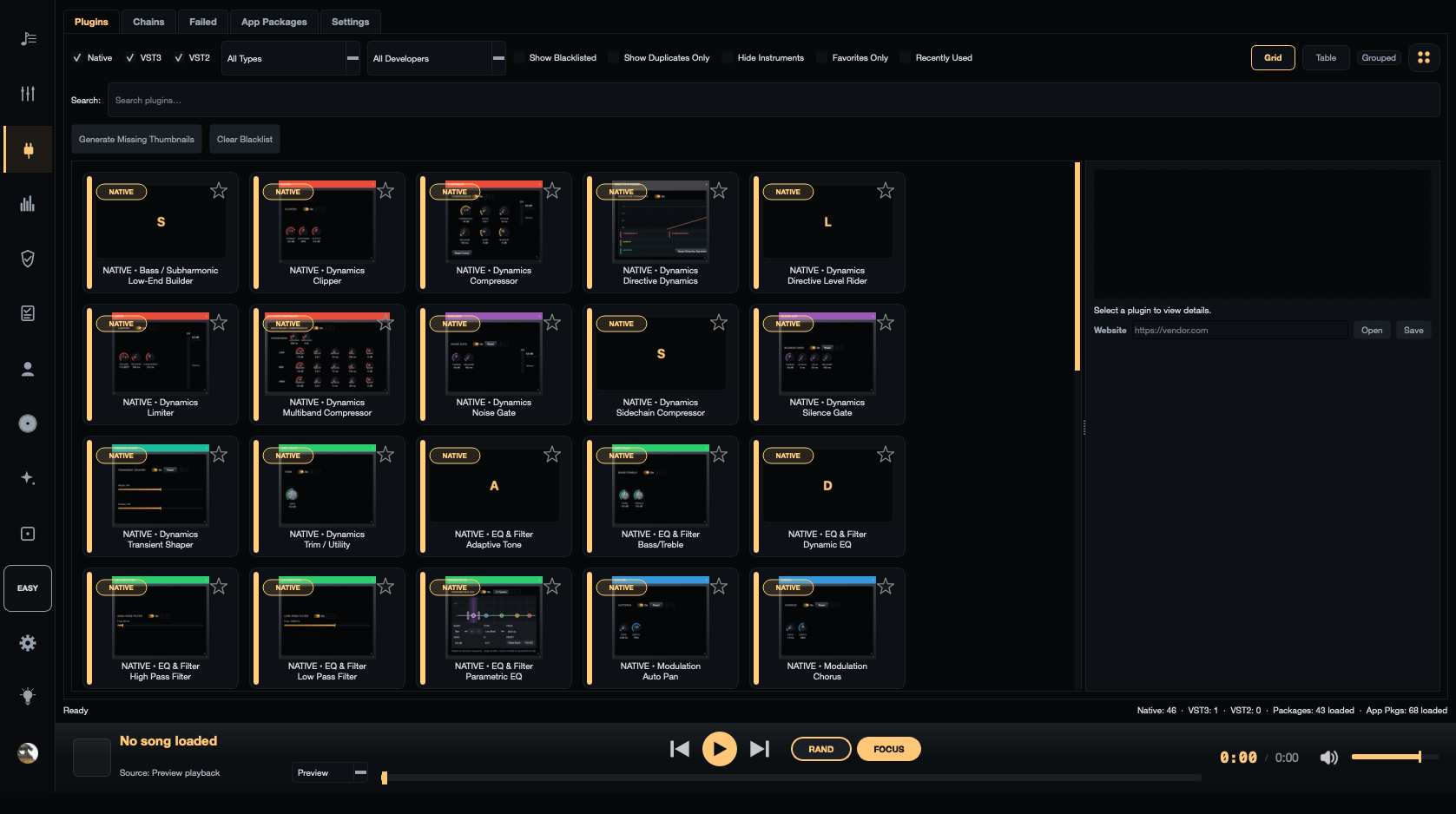
Mix Directive Plugins workspace showing native effects grouped by category

Mastering

Master with the numbers in view.

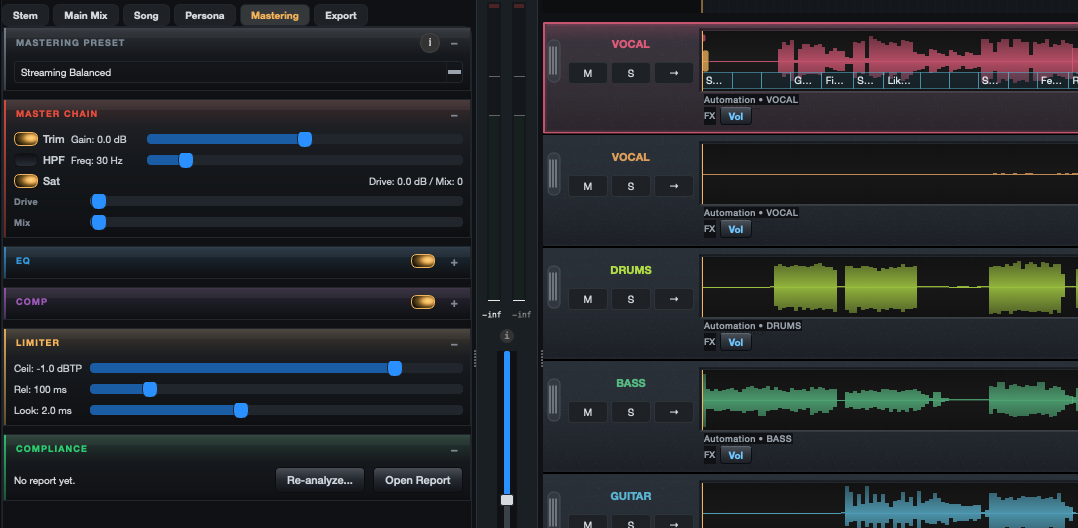
Master a full mix with presets or by hand, or use Easy Master to render, check, and keep a mastered copy in one step.
Easy Master
Renders a master, checks its true peak and loudness, and corrects them.
Mastering chain
Presets with EQ, compression, saturation, Match EQ, and a true-peak limiter.
Metering
Peak, RMS, LUFS, true peak, phase correlation, and a goniometer.
Eval Master
A/B the master against the mix.
Mix Directive mastering panel with the Streaming Balanced preset, master chain trim, filter and saturation, EQ and compressor stages, a true-peak limiter set to −1.0 dBTP, and a compliance report, beside the stem lanes

Release Readiness

Get songs and albums ready to send.

Keep artwork, credits, codes, and details with the audio, check what is missing, then assemble an upload kit for your distributor.
Readiness checks
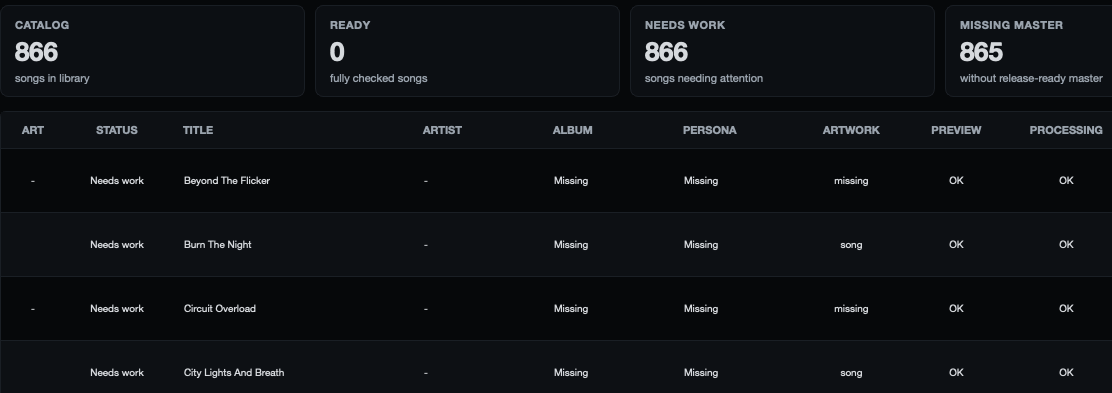
See which songs are ready, need work, or are missing a master.
Albums
Sequence tracks and export an album package.
Artist Personas
Keep separate artist profiles and their releases apart.
Upload Kit
Files and checklists for DistroKid, TuneCore, CD Baby, and Bandcamp. You upload them yourself.
Release metadata
ISRC and UPC fields, credits, lyrics, and artwork.
Mix Directive Release Readiness showing catalog, ready, needs-work, and missing-master totals above a table listing songs with album, persona, artwork, preview, and processing status

More tools for the details.

Stem separation

Split a finished song into stems on your own computer.

Mix Directive Stem Splitter separates a mix into vocals, drums, bass, and other. It runs locally, so your audio is not uploaded.

  • Four stems. Vocals, drums, bass, and other, for a whole song or from inside Studio.
  • Runs locally. The separation model downloads once, then works on your machine.
  • Separate a single stem. Split an existing stem further.Experimental
  • Vocal isolation for lyrics. A temporary vocal pass so full mixes can be lyric-aligned.

Spectral Editor

See a problem, then paint it out.

The Spectral Editor shows audio as a spectrogram so you can select and repair noise, hum, clicks, and harsh moments directly.

  • Select and paint. Attenuate or repair any region you draw.
  • Noise and hum. De-hum and de-noise with learned noise profiles.
  • Clicks and sibilance. De-click, crackle, plosive, and de-ess repairs.
  • Extract to a stem. Move a selection onto its own stem.
  • Listen closely. Linear, Mel, and Log frequency scales with Band Solo and Selection Solo.

Pitch Editor

Note-by-note pitch editing.

The Pitch Editor lane adjusts individual notes on a monophonic stem such as a lead vocal, without changing the original file.

  • Per-note correction. Move, tune, and smooth individual notes.
  • Non-destructive. Edits stay in the mix and can be changed later.
  • Pitch effects. Pitch Shift and Pitch Doubler effects.

MIDI and recording

Record parts and write new ones.

Record audio or MIDI, then edit notes in the Piano Roll or build patterns in the Step Sequencer.

  • Audio recording. Input choice, armed tracks, count-in, monitoring, and punch-in.
  • Piano Roll and Step Sequencer. MIDI clips with note editing and quantise.
  • Instruments. A built-in synth and sampler.
  • MIDI Learn. Map controller knobs and faders to parameters.

Quality Control

Check the audio before anyone else hears it.

Quality Control and the analysis tools flag clipping, loudness, masking, and exports that do not match what you heard.

  • Audio audit. Pass, Review, Fail, or Incomplete after each render.
  • Mix Health and Clash Watch. Find stems masking each other and mix-level problems.
  • Compare exports. Compare the live mix against its exported files.
  • CoreMix. Blind listening comparisons of the current, suggested, and original mix.

Projects and versions

Keep every direction you tried.

Saves become numbered revisions with notes, so you can compare, restore, or branch a mix instead of overwriting the one that worked.

  • Mix revisions. Numbered saves with notes, bookmarks, comparison, restore, and branches.
  • Autosave. Optional autosave every minute.
  • Templates. Studio templates for a repeatable starting point.
  • Interchange. Import DAWproject; export DAWproject, REAPER project, AAF, and MIDI.

Lyrics and Visualizer

Words and pictures that follow the music.

Align lyrics to the audio word by word, and watch songs through audio-reactive visualizers.

  • Auto Align Lyrics. Word timing you can edit and lock.
  • Visualizers. Spectrogram, oscilloscope, stereo field, 3D landscapes, and more.
  • Custom shaders. Import your own .frag shaders, including multi-pass shaders.

Ask your library

Ask questions about your library in plain English.

An optional local AI model searches your library and makes one simple mix change at a time. It runs on your computer.

  • Library search. Find songs by describing them.
  • Simple mix requests. One change per request, such as a level or tone adjustment.
  • Optional download. Nothing is installed until you choose to add the model.

Available on macOS with Apple Silicon and on Windows. Not yet available on Linux or Intel Macs.

Audio formats

Import
WAV, AIFF, FLAC, MP3, Ogg Vorbis, Opus, AAC / M4A, ALAC, CAF, and ZIP archives of stems.
Export
WAV, FLAC, AIFF at 44.1, 48, 88.2, or 96 kHz and 16-bit, 24-bit, or 32-bit float. Full mixes, masters, and separate stems.
With FFmpeg
MP3, AAC / M4A, Ogg Vorbis export when FFmpeg is installed on your computer. It is not included with Mix Directive.

Try it during the free public beta.

Every registered account gets every feature on this page, on any of your computers. No subscription or payment is needed during the beta.