Skip to content
Mix Directive

A workflow for finished music

Finish more songs.
Lose less context.

Keep every version, stem, and mix decision attached to the song — from first import to release-ready master. Windows, macOS, and Linux.

Mix Directive Studio mixer showing vocal, drums, bass, and guitar waveforms alongside effects and metering
Real product preview · Studio mixerOrganise → mix → master → release

Windows

Desktop app

macOS

Desktop app

Linux

Desktop app

01 · Find

Stop losing the latest version.

02 · Shape

Hear every decision in context.

03 · Check

Catch release problems early.

04 · Finish

Hand off a complete release.

Hear the difference

Same performance.
Different mix.

Pick a track, press play, then switch between the original and mixed versions without losing your place.

Short original demos · Matched selections for a direct comparison · Headphones recommended

Choose a song sample

01 · R&B / soul

Urban Echo

Vocal clarity · low-end control

0:000:49

Listening: Original version

Both versions stay locked to the same moment.

Before you upload

A generation is a starting point, not a master.

The song is written and the performance is there. What is missing is the pass that makes it hold up next to everything else on the playlist.

  1. 01

    Every generation lands at a different level.

    Streaming platforms normalise playback: too loud simply gets turned down, too quiet sounds thin next to everything else.

    Meter LUFS and true peak on every song, then run one mastering chain across the catalogue so the release sits together.

  2. 02

    Peaks that look fine can clip after upload.

    Platforms re-encode your upload, and levels sitting right at the ceiling can overshoot once converted.

    A true-peak limiter with a ceiling you set — the streaming preset ships at −1.0 dBTP — leaves the headroom encoding needs.

  3. 03

    Models leave things behind.

    Warble, harsh sibilance, hiss in the gaps, or a low end that swamps everything above it.

    De-warble, de-ess, gate, filter, and clarity tools sit in the chain — so you fix the vocal without touching the drums.

  4. 04

    A missing detail holds up the whole release.

    Distributors want artwork, metadata, and a release-ready master. One gap delays the whole upload.

    Release Readiness lists every song against every check, so you find the gap before the distributor does.

Stems if you have them. Full mix if you don't.

Stems give you the most control: fix a harsh vocal without touching the drums, and rebalance what the model mixed for you. No stems? Master the finished track instead — the same metering, chain, and checks apply either way.

One clear workflow

From scattered files to a finished release.

Follow the work in the order it actually happens: find the right version, make the mix work, check the master, and hand off a complete release without rebuilding the context somewhere else.

1 / 4

01 · Catalogue

Find the version worth finishing.

INGEST

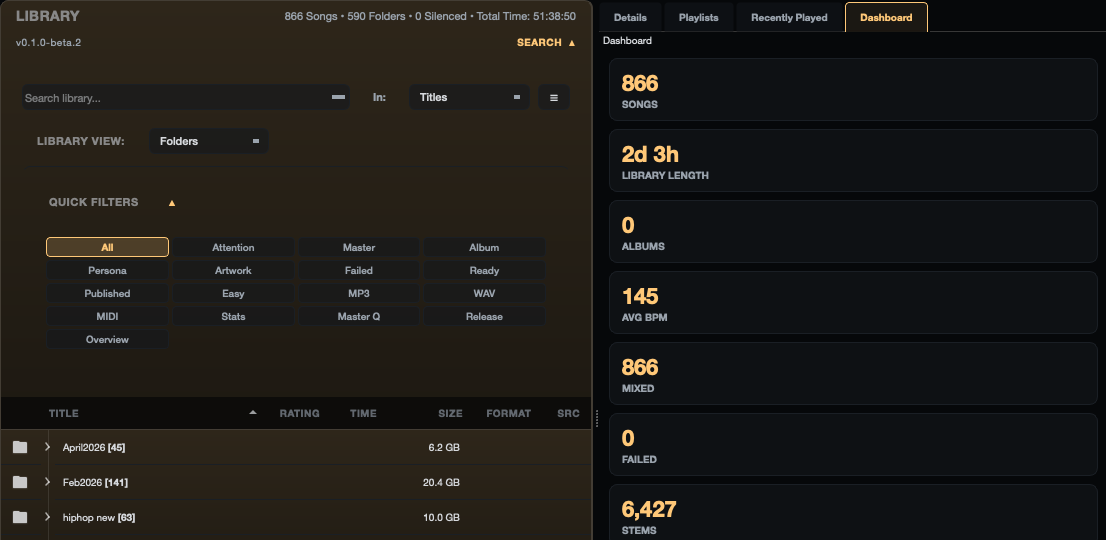
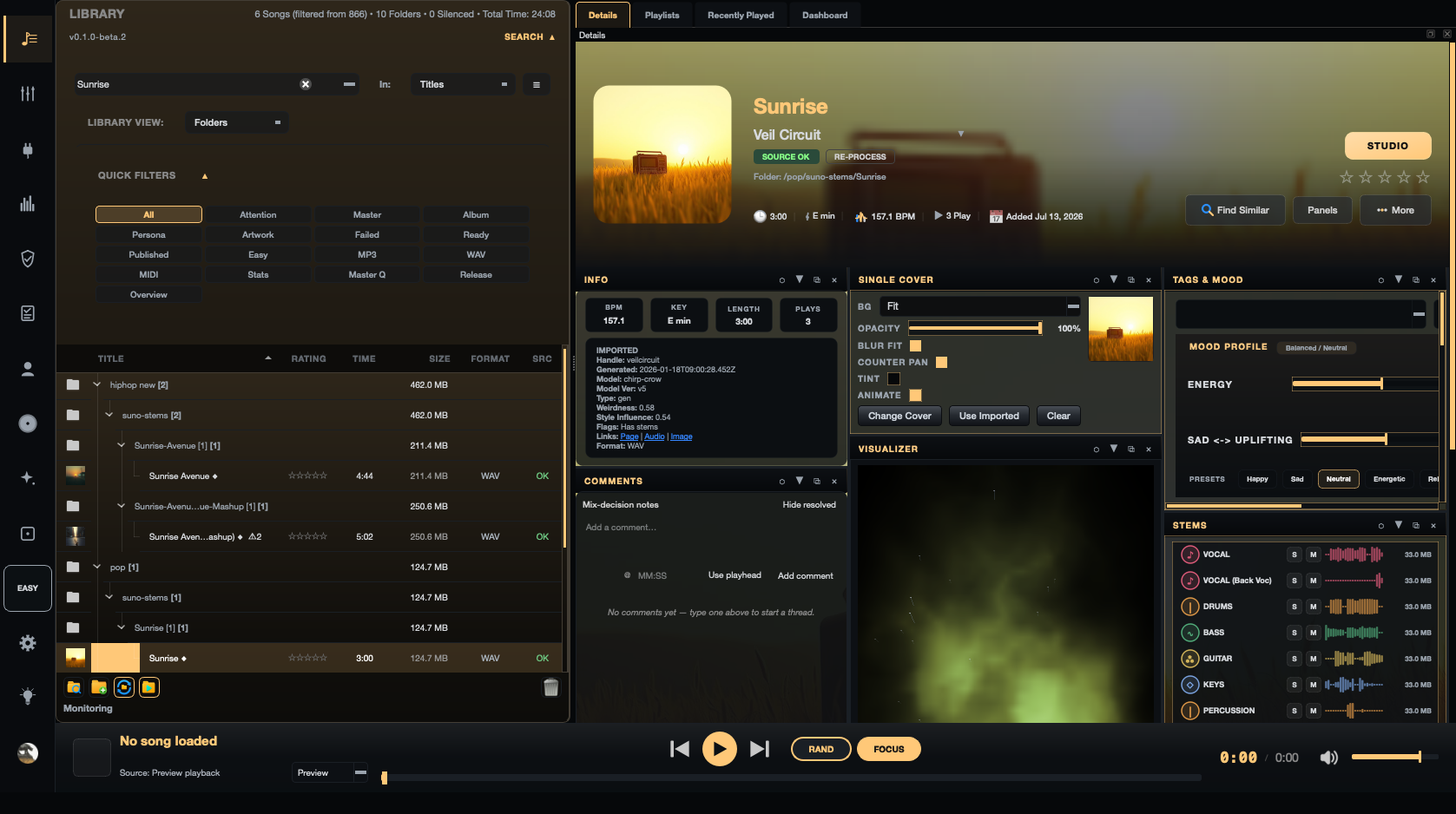
Organise songs and versions before you mix: bring ZIPs, folders, alternate versions, artwork, lyrics, and metadata into one searchable library. Deep scanning and source health help you start with the right material.

Mix Directive library showing 866 songs across 590 folders, a search field, quick filters for artwork, master, and release state, and a folder list with sizes, beside dashboard tiles for songs, library length, and stems
  • Deep scanning with duplicate detection
  • Zero-extraction previews
  • Search, tags, mood, and smart playlists
  • Source health and repair paths

02 · Studio

Make the mix work in context.

MIX

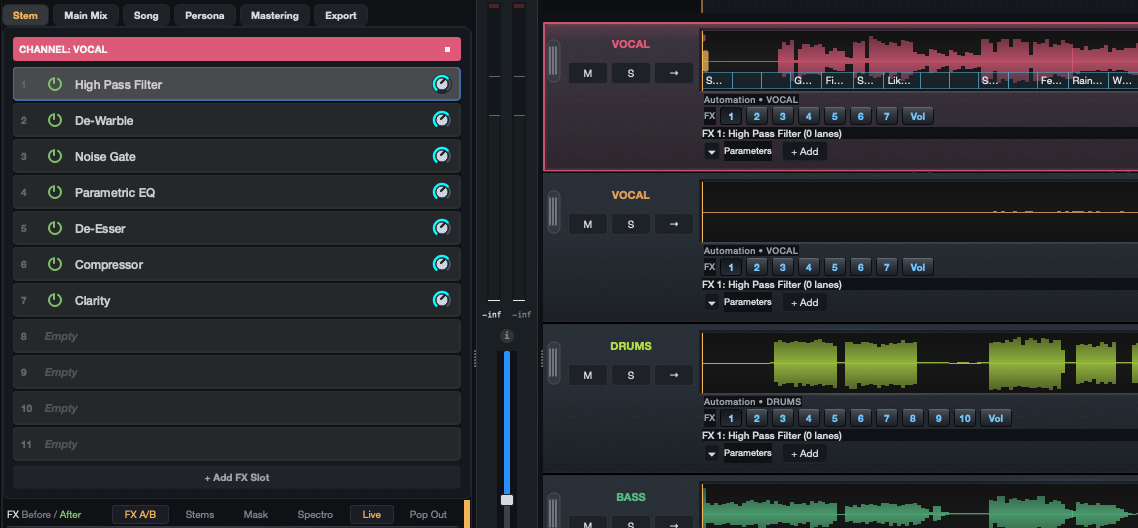
Open a full mix or multitracks, balance stems, compare a reference, and reach for automation, routing, clips, or supported plugins only when the song needs them.

Mix Directive Studio showing the vocal channel chain — High Pass Filter, De-Warble, Noise Gate, Parametric EQ, De-Esser, Compressor, and Clarity — beside vocal, drums, and bass stem lanes with automation controls
  • Reference-track A/B with level matching
  • Automation, buses, sends, and returns
  • Clip editing, fades, time, and pitch
  • Native and VST3 effects

03 · Master

Know what the master is doing.

CONTROL

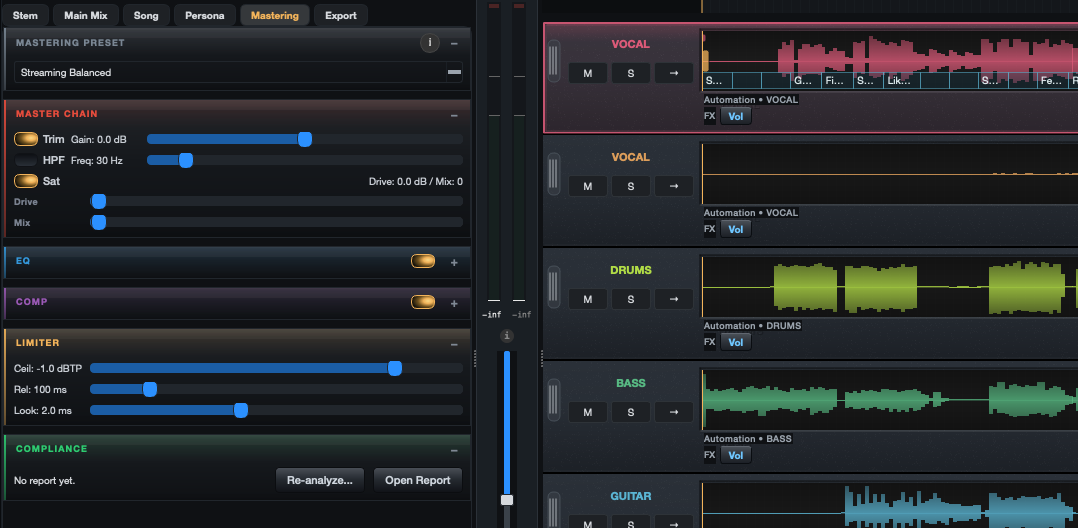
Keep the final decision yours with analysis and metering that make problems visible. Analyse and master a full mix with manual control or guided chains, then render the format the next step needs.

Mix Directive mastering panel with the Streaming Balanced preset, master chain trim, filter and saturation, EQ and compressor stages, a true-peak limiter set to −1.0 dBTP, and a compliance report, beside the stem lanes
  • LUFS and true peak metering
  • Phase correlation and mono check
  • Manual or guided mastering
  • Mix and stem exports

04 · Release

Hand off with the details intact.

READY

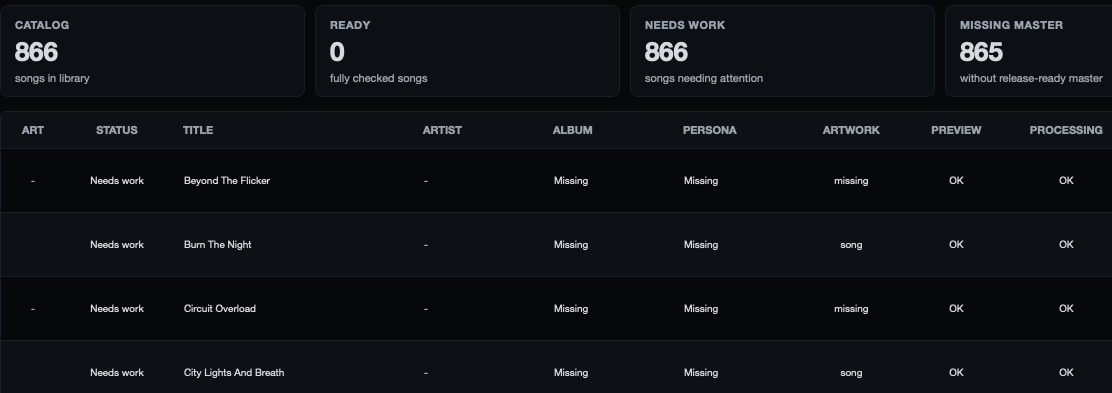
Keep the identity of the song beside the audio. Run a readiness pass before upload, then export songs, stems, or repeatable batch jobs with a report you can review later.

Mix Directive Release Readiness showing catalog, ready, needs-work, and missing-master totals above a table listing songs with album, persona, artwork, preview, and processing status
  • Artwork, lyrics, credits, and metadata
  • Release readiness checks
  • Single-song and stem exports
  • Repeatable batch jobs and reports

Repeatable work

Make the second song faster than the first.

BATCH / REPORT

When the decisions are known, run a folder or manifest through the same render path, apply the chosen mastering preset, and keep a JSON report beside the output.

01 · QUEUEAdd songsZIPs, folders, or a manifest
02 · RENDERApply the pathFX, master preset, export
03 · REVIEWRead the reportSettings, outputs, and results

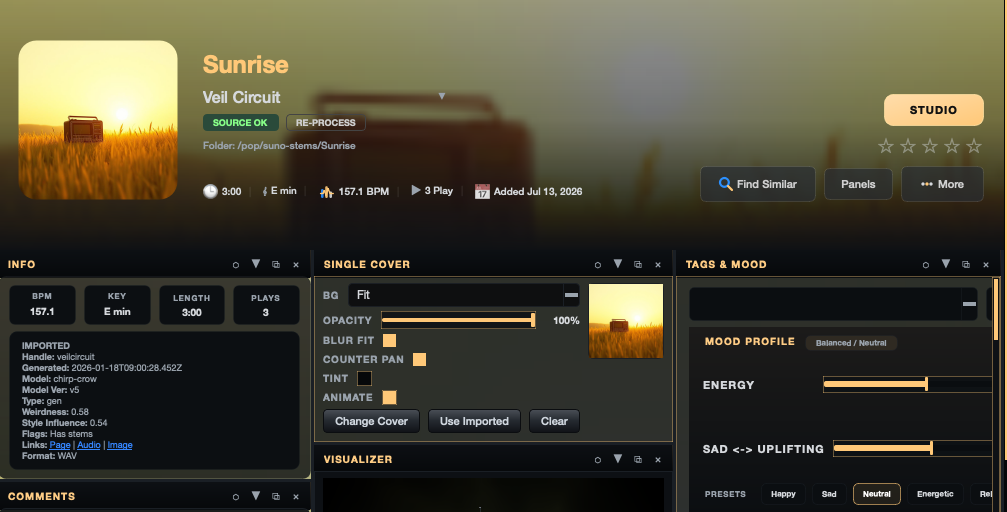
Catalogue + song details

Start from the song, not the folder.

See the latest version, artist identities, and the details that make it release-ready in the same place you audition the audio.

Mix Directive song details for Sunrise by Veil Circuit — cover artwork, source-OK status, folder path, length, key, tempo and play count, an info panel with imported metadata, cover controls, and a tags and mood profile
Library · Song details

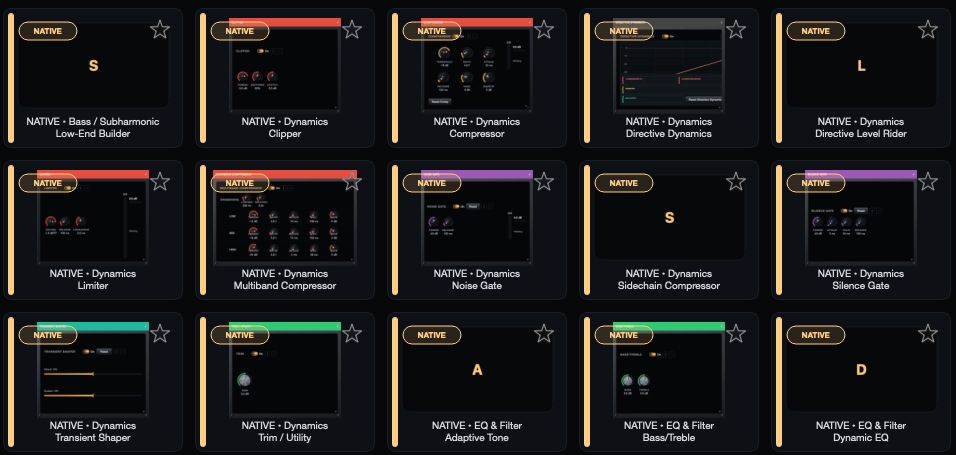
Effects + plugins

A full effects rack, built in.

Compressors, EQs, gates, limiters, and shaping tools ship with the app — and your own VST3 plugins load beside them.

Mix Directive plugin browser grid showing built-in effects including Low-End Builder, Clipper, Compressor, Directive Dynamics, Level Rider, Limiter, Multiband Compressor, Noise Gate, Sidechain Compressor, Silence Gate, Transient Shaper, Trim and Utility, Adaptive Tone, Bass and Treble, and Dynamic EQ
Plugin browser · Native effects shown

Before you join

What the beta is like.

Mix Directive is under active development. Builds may contain bugs, so keep your own backups — never let a beta be the only copy of work you care about.

All three platforms

Windows, macOS, and Linux builds ship together — no waiting for your OS.

One workflow

Catalogue, studio, mastering, and release all live in the same app.

A small group first

Invites go out in batches so feedback actually shapes the next build.

Sign-in gated builds

Downloads unlock for accepted testers from your account page.

Questions

Before you ask.

Still unsure about something? Email hello@mixdirective.com.

Does my music get uploaded anywhere?

No. Mix Directive is a desktop app, and your songs, stems, lyrics, artwork, and exports stay on your machine. Usage telemetry is off until you turn it on, and even then it never includes audio, filenames, paths, prompts, or lyrics.

Do I need stems, or can I use a finished track?

Either works. Stems give you the most control — you can fix a harsh vocal without touching the drums. With only a stereo mix you still get the full mastering chain, metering, and release checks.

What can I bring in?

ZIP archives, folders, and loose files, along with alternate versions, artwork, lyrics, and metadata. Songs are previewed without extracting the archive first, so a large library stays quick to move through.

What does it cost while it is in beta?

Nothing, and accepted testers get the complete feature set. The Free and Pro plans on the pricing page start when Mix Directive leaves beta.

Private beta

Be first to finish with it.

Tell us about your setup and the part of your workflow you want to improve. We will email you when your beta invite is ready — no spam, just a focused desktop tool for finishing music.

Wondering what it will cost? See the planned Free and Pro plans.